Prepaid phone eSIM activation guide
N-Telecom prepaid eSIM is a way to activate online with LG without buying a SIM. The issuance fee is 2,750 KRW, and it works on iPhone 11 and later and on Galaxy S23, Z Flip4, and Z Fold4 and later. You activate in your own name after identity verification, with no credit check.
- Issuance fee
- 2,750 KRW · credit card payment
- Carrier
- LG activation only
- New sign-up
- Every day 8:00 a.m. to 9:30 p.m.
- Number porting (MNP)
- Mon to Sat 10:00 a.m. to 7:30 p.m.
Prepaid eSIM activation steps, follow along on screen
Tap the red marks in order. Swipe to the right.
Check eSIM readiness
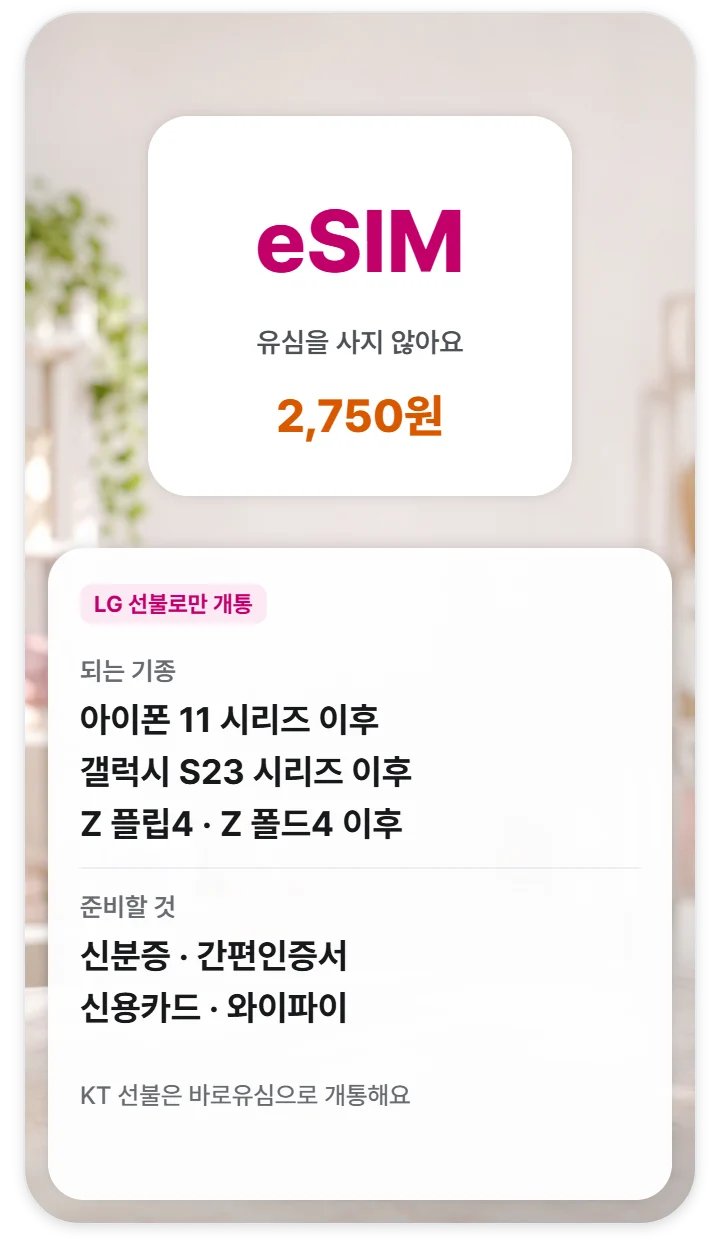
Activate with LG without buying a SIM. The issuance fee is 2,750 KRW.
Choose a network
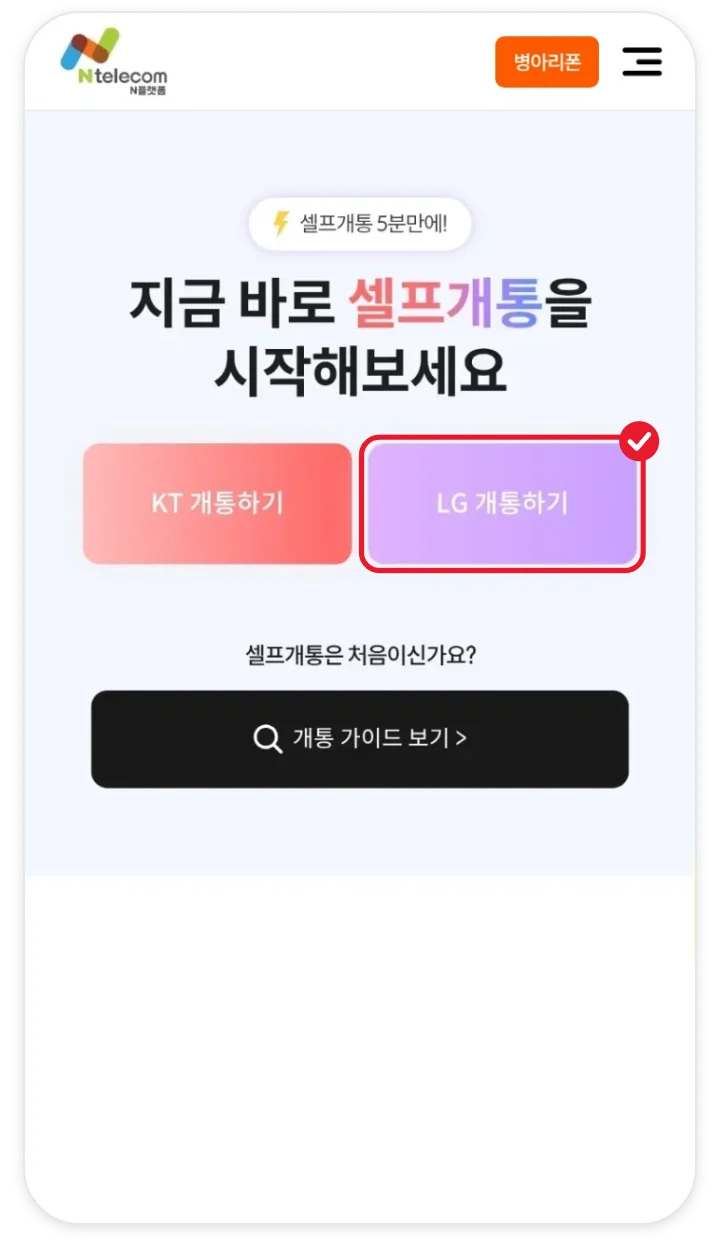
Prepaid eSIM can only be done with the red-marked Activate with LG (LG 개통하기) button.
Choose a sign-up type
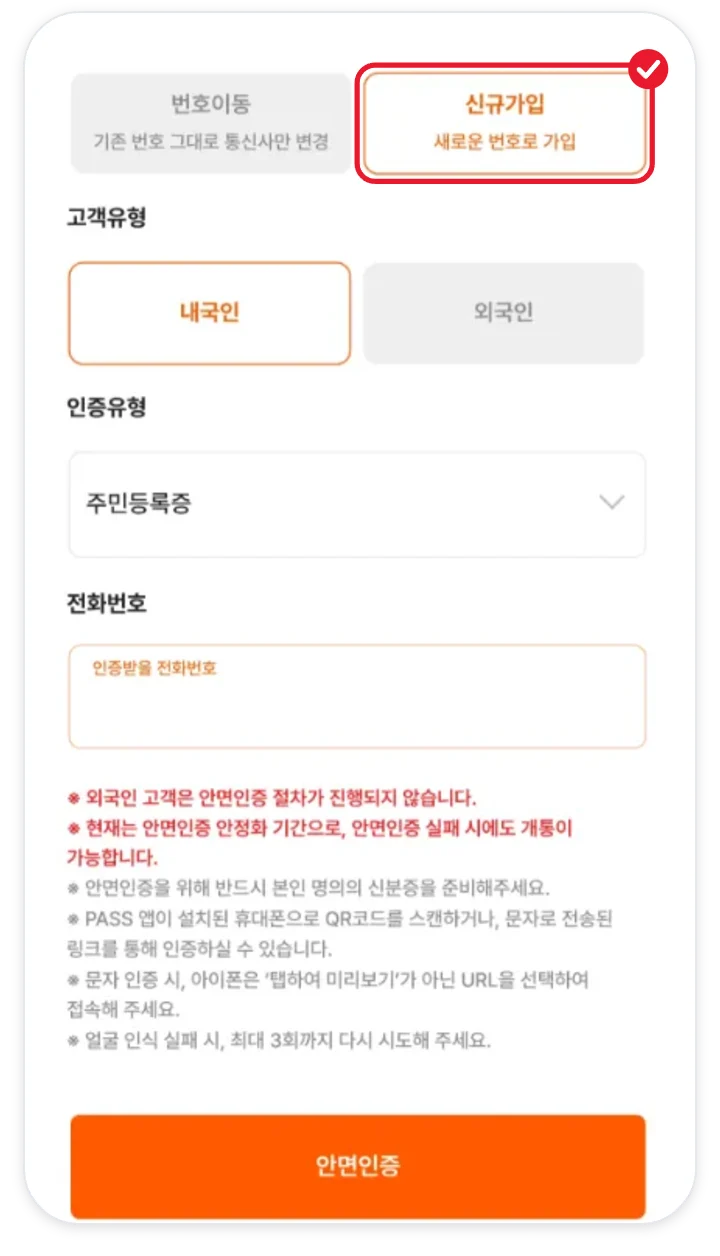
Tap new sign-up for a new number, or number porting to move your current number.
Face verification
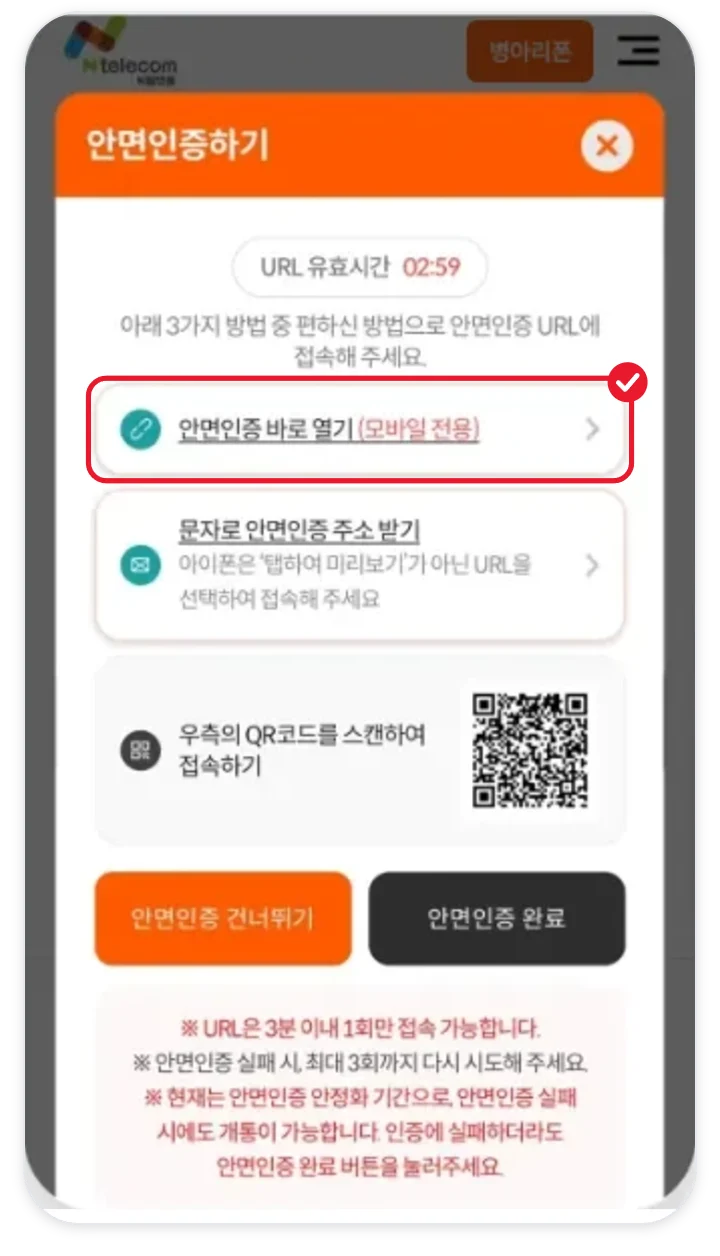
Match your face and ID at the address shown. If you fail 3 times, you move on to the next step.
Simple authentication
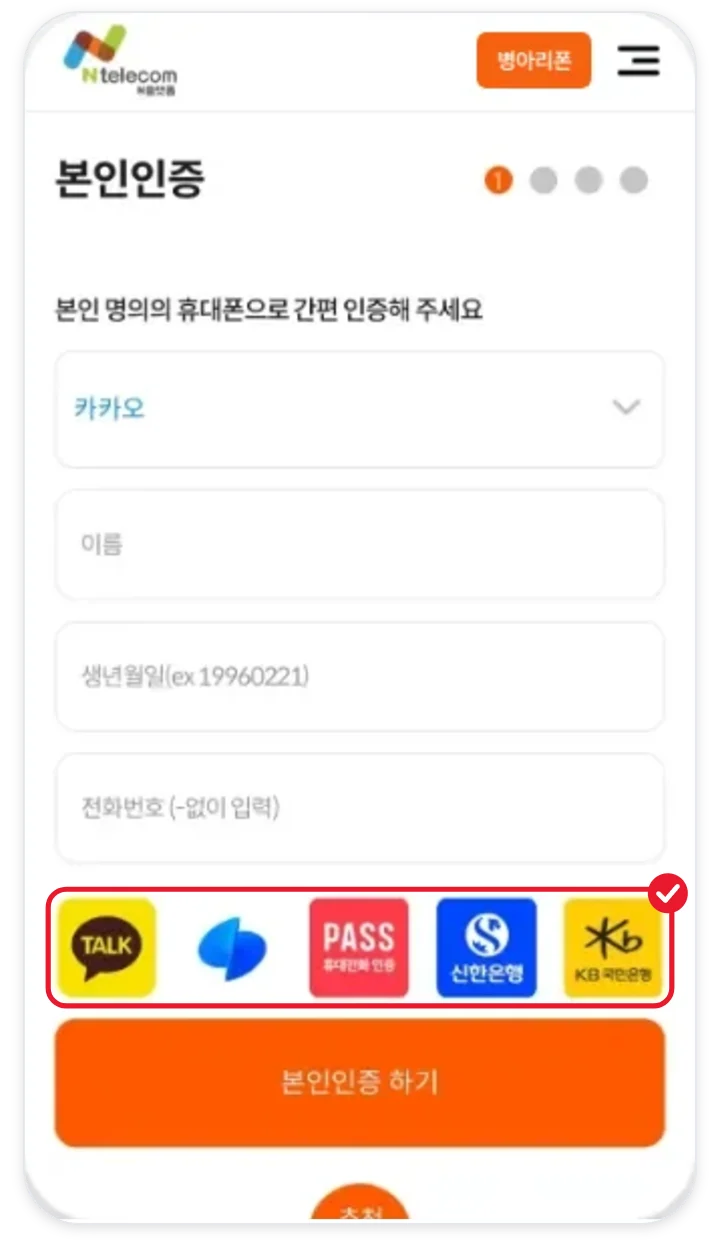
Verify your identity with one of KakaoTalk, Toss Bank, PASS, KB Kookmin Bank, or Shinhan Bank.
ESIM as the SIM type
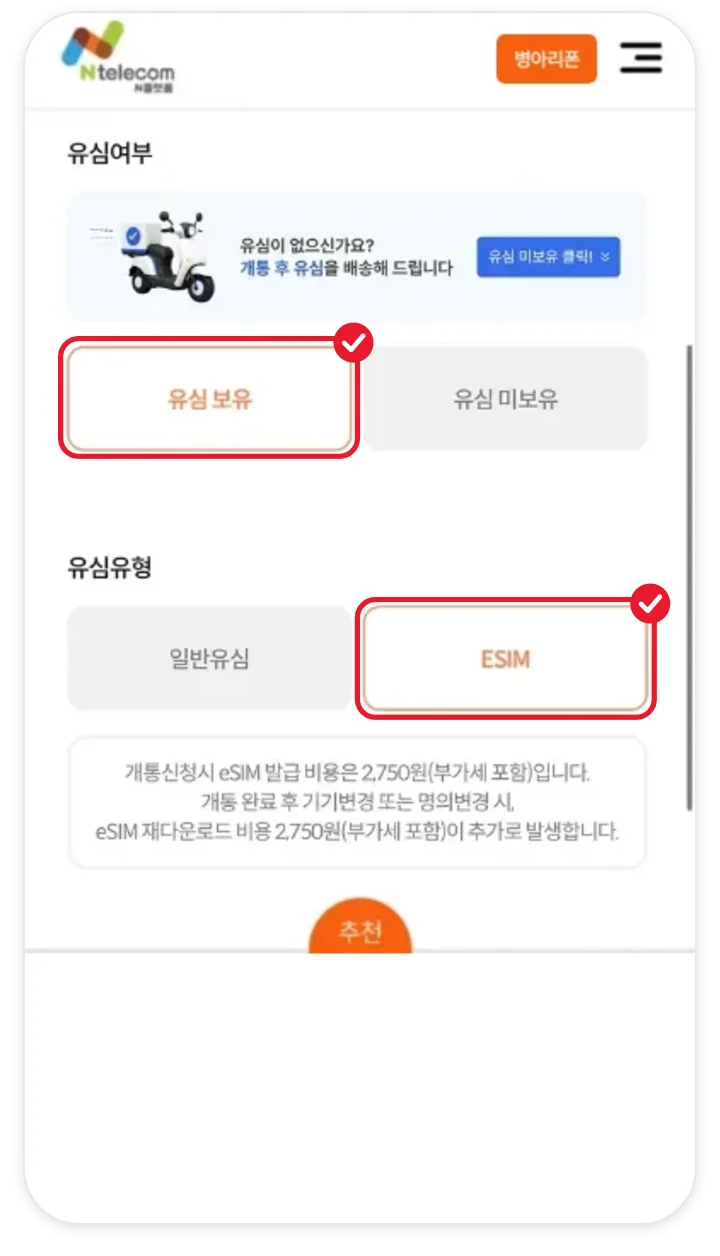
Tap I have a SIM (유심 보유) and choose ESIM under SIM type (유심유형).
Enter device information
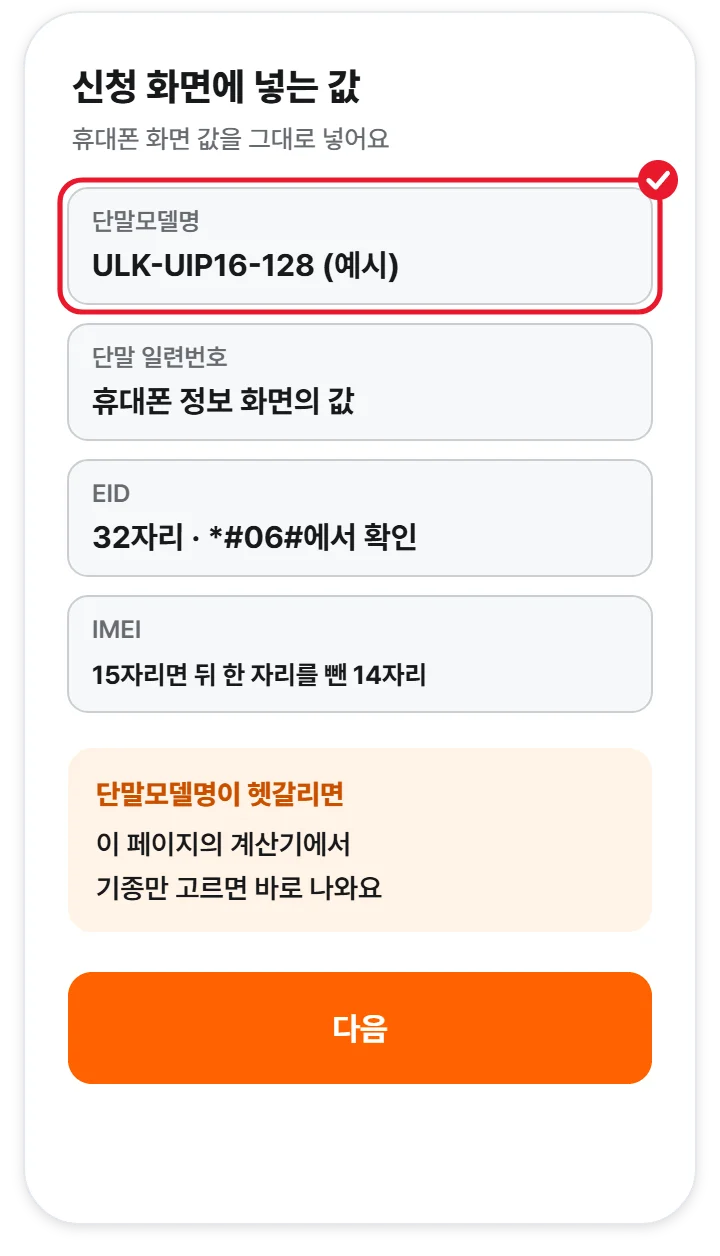
Upload the barcode image and it fills in automatically. If it is not recognized, check with the calculator below and enter it yourself.
Choose a plan
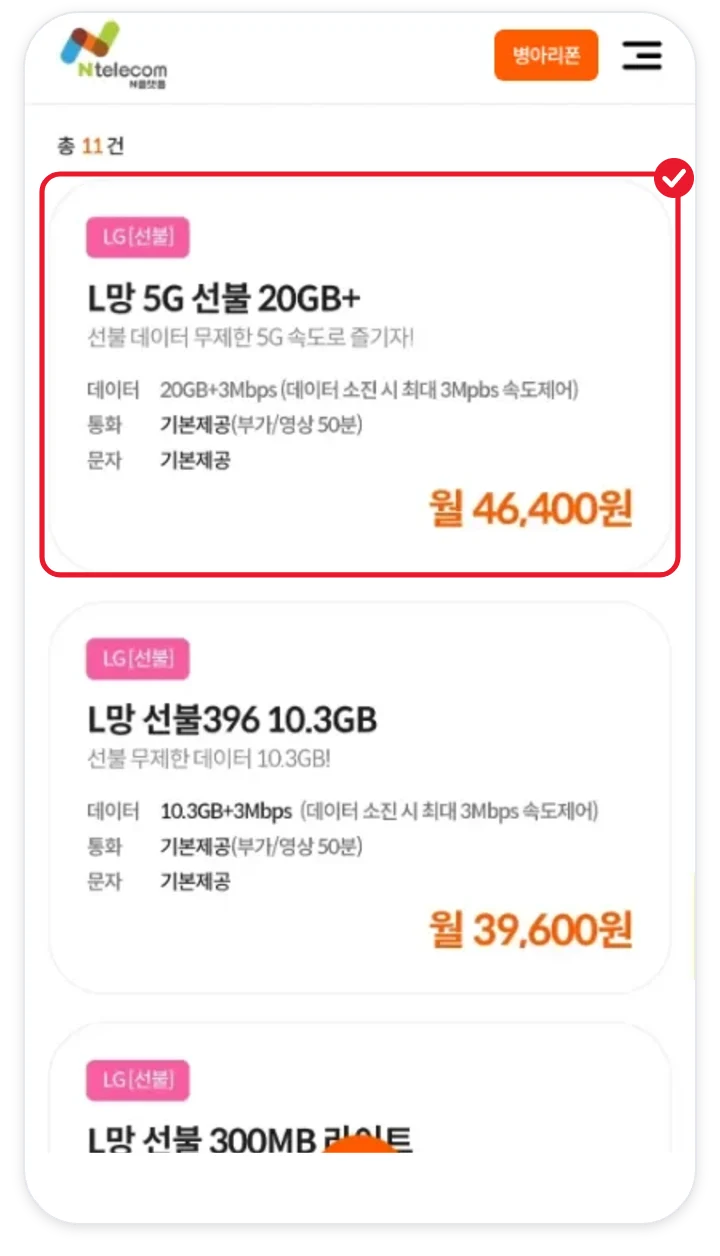
Choose from the LG prepaid plans. With a 5G phone you can also use 5G 464.
Pay the issuance fee
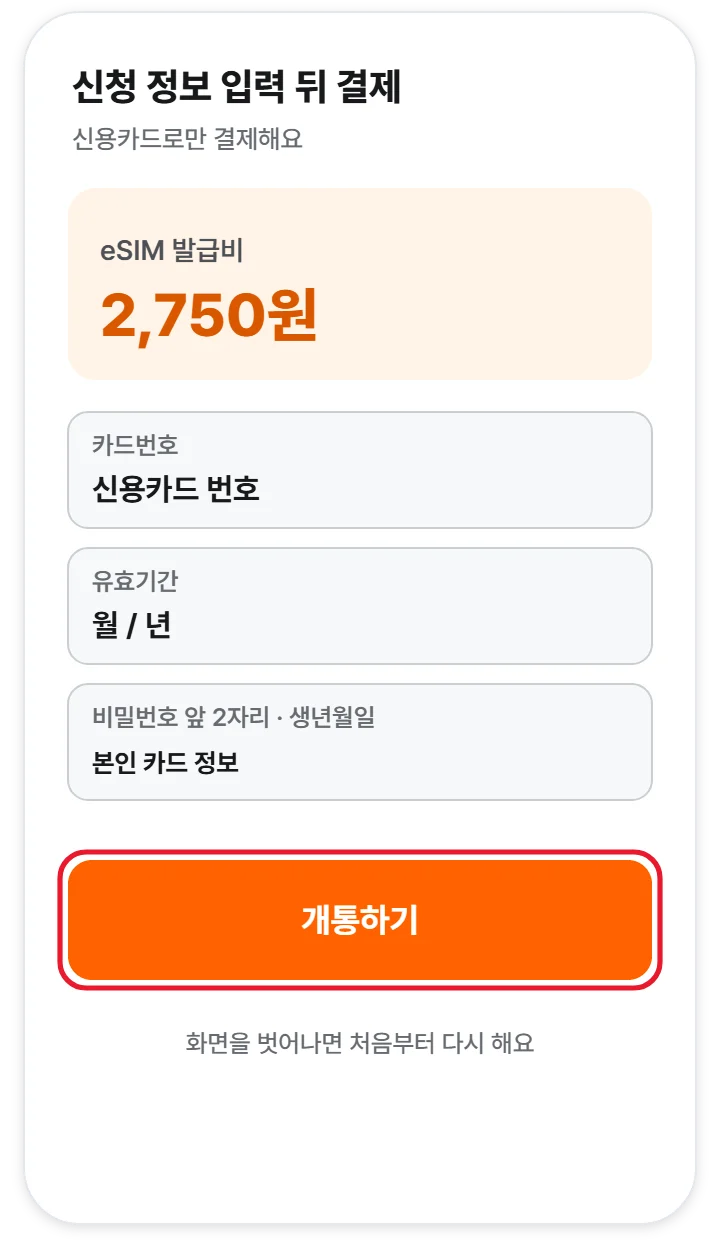
Enter your application details and pay 2,750 KRW by credit card.
Install with the QR code
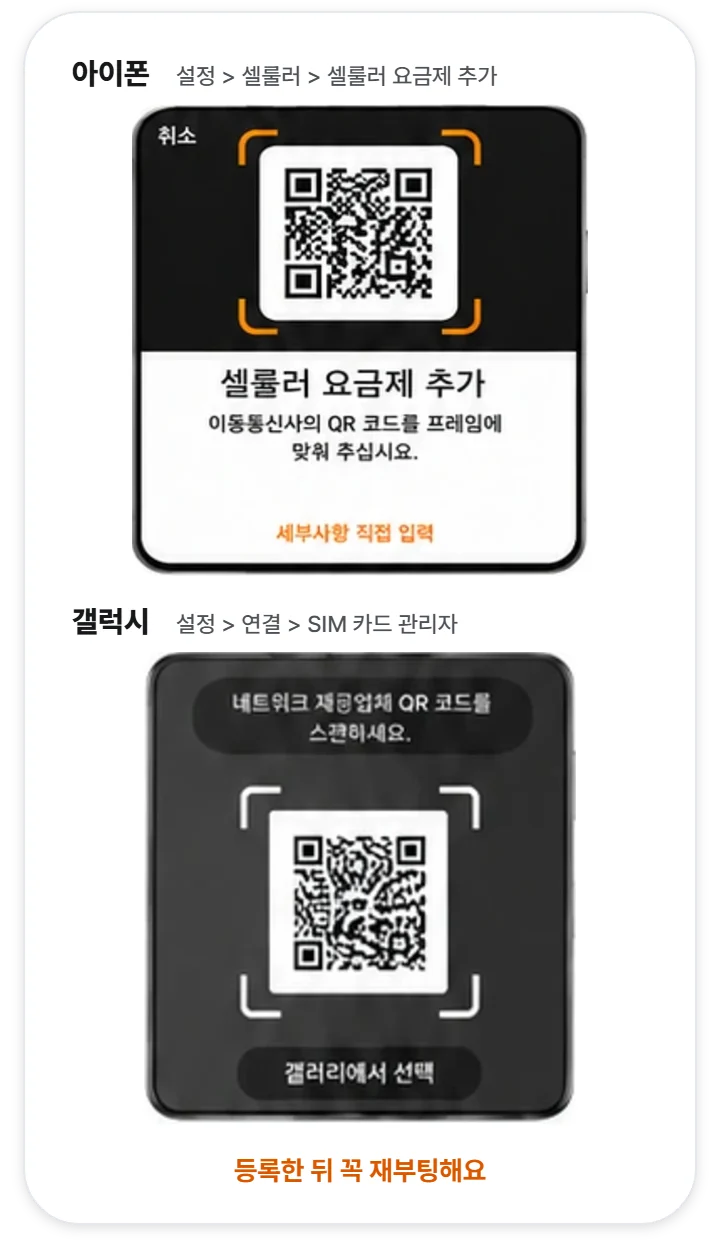
Register with the QR code or activation code you receive after approval, then reboot.
Top-up and confirmation call
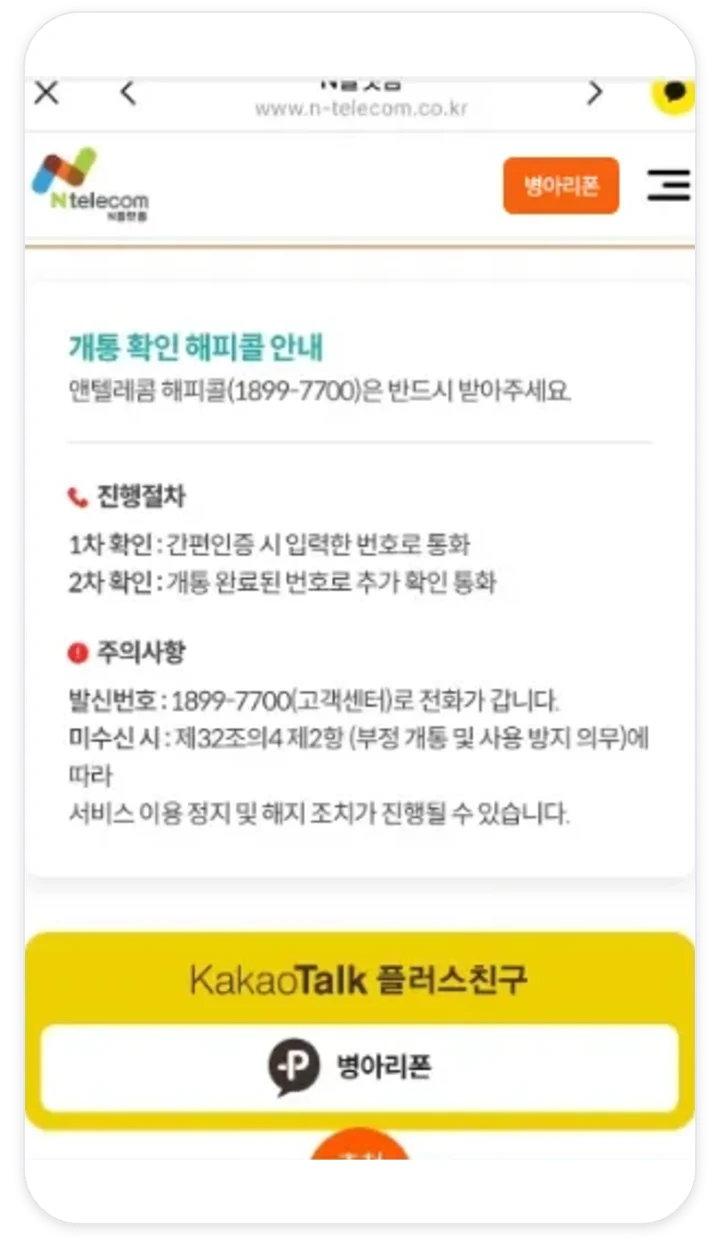
Top up on the day of activation, and answer the 1899-7700 call that comes within 3 days.
Device information is filled in automatically from the barcode
This reduces mistakes from typing by hand. Enter it yourself only if it is not recognized.
Enter *#06# on the keypad
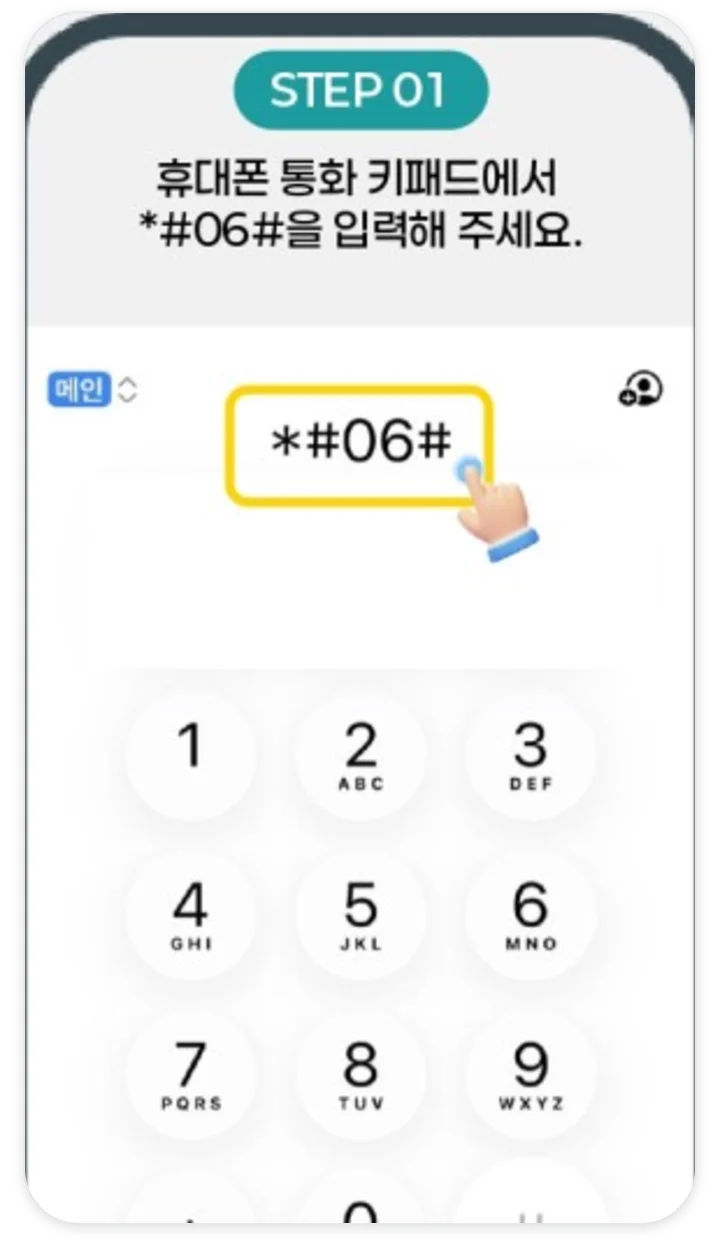
On the call keypad of the phone you will activate, press *#06#.
Capture the barcode screen
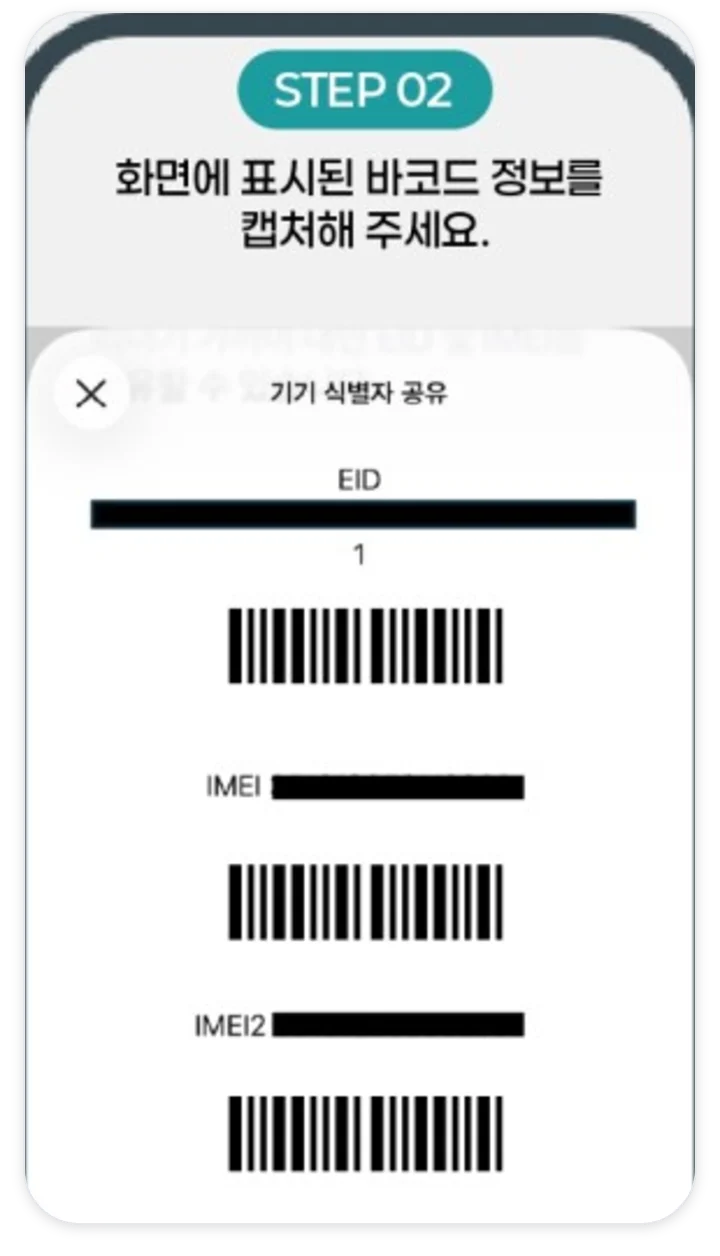
Capture the EID and IMEI barcodes shown on the screen.
Choose the file and recognize the barcode
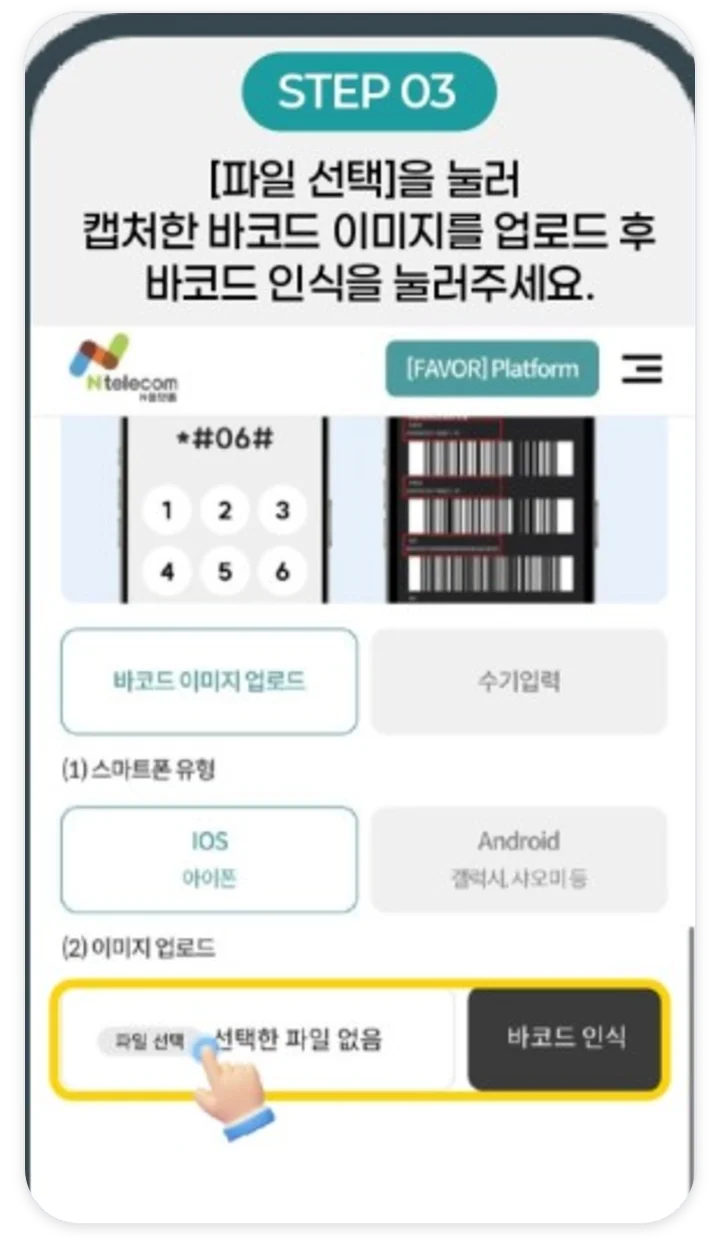
On the application screen, upload the capture with Choose file (파일 선택) and tap Recognize barcode (바코드 인식).
Look up and register
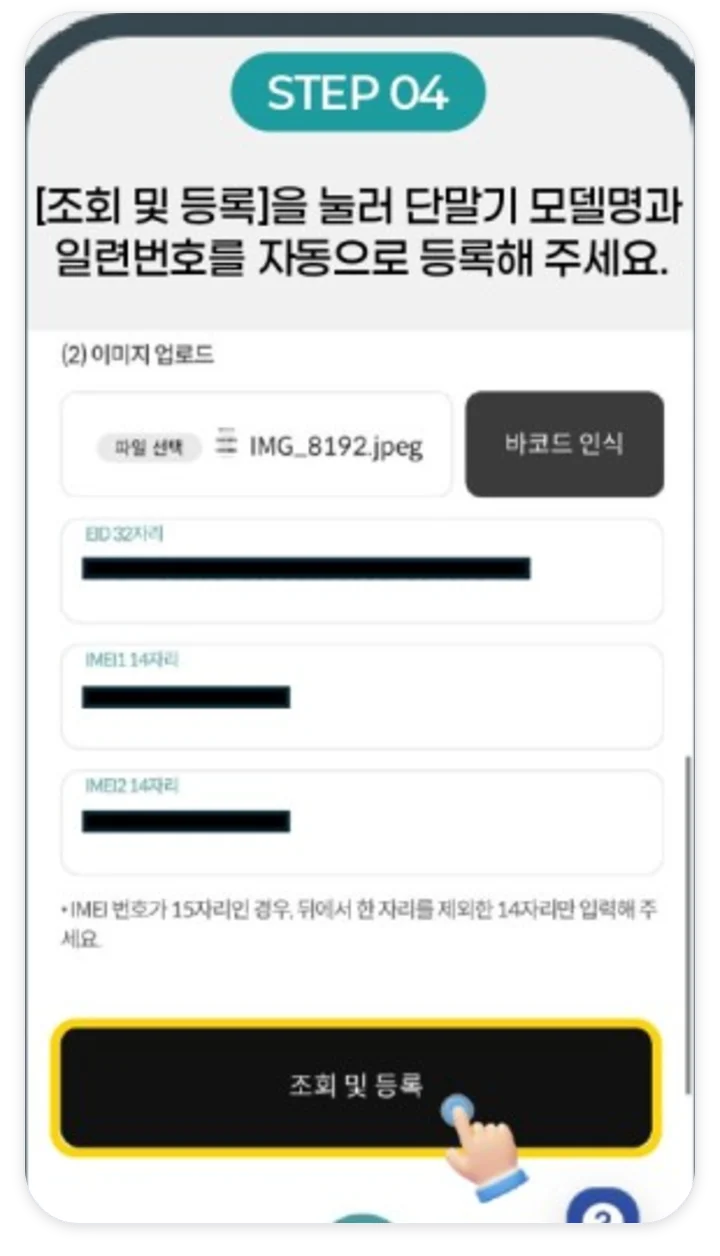
Tap Look up and register (조회 및 등록) and the device model name and serial number are registered automatically.
Check the auto-filled values
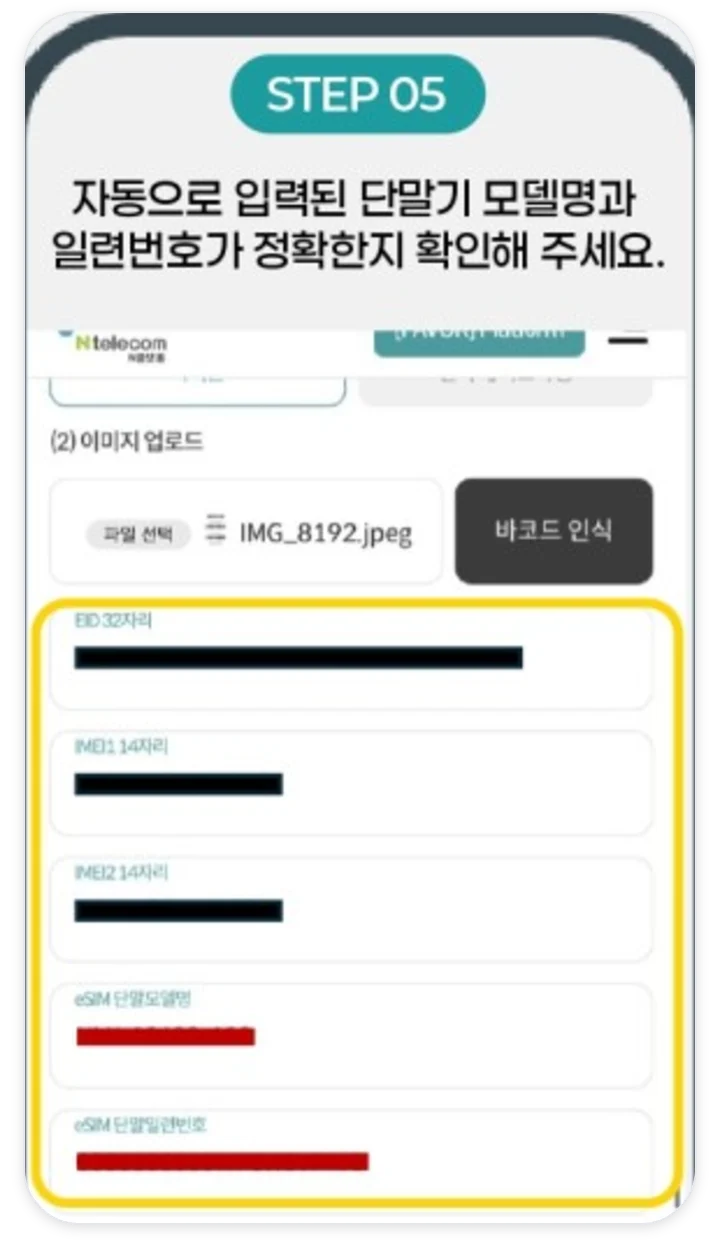
Be sure to check that the auto-filled values are correct.
Move on to the next step
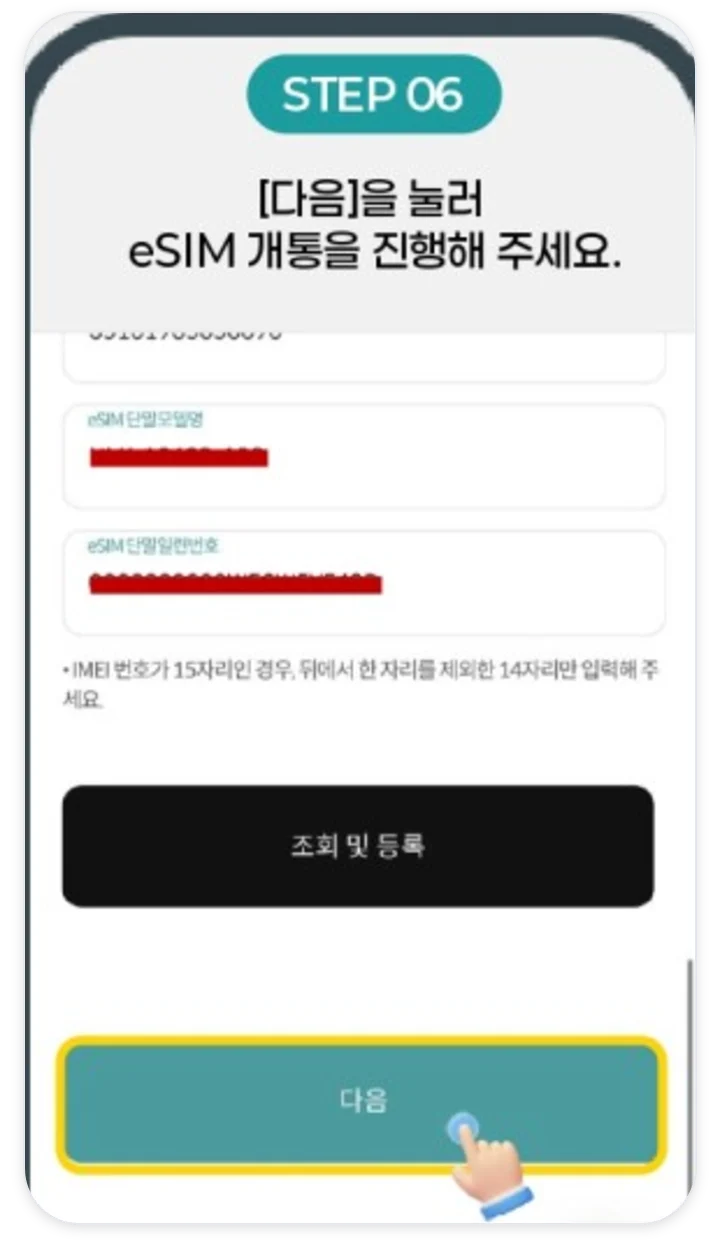
Tap Next to continue the eSIM activation.
Can I activate a prepaid eSIM on my phone?
You can if you have an iPhone 11 series or later, a Galaxy S23 series or later (including FE phones), or a Z Flip4 or Z Fold4 or later. If an EID appears when you press *#06# on the keypad, the phone has eSIM capability.
| Category | Supported models | Unsupported models |
|---|---|---|
| iPhone | iPhone 11 series and later | XS, XS Max, XR, SE (2nd and 3rd generation) |
| Galaxy | S23 series and later (including FE phones), Z Fold4 and Z Flip4 and later | Tablets (Tab S10 FE, FE+) |
Self-purchased (unlocked), refurbished, and overseas-bought phones may differ in whether they work. On Galaxy, be sure to turn off “Restrict use of other SIMs (다른 SIM 사용 제한)” under Settings > Security and privacy > More security settings > SIM card security.
What is the difference between eSIM and a SIM?
An eSIM costs 6,050 KRW less up front than a SIM (8,800 KRW) and you do not need to go buy one. However, you pay a 2,750 KRW reissue fee every time you change phones.
| Item | eSIM | Physical SIM |
|---|---|---|
| First cost | 2,750 KRW | One-Chip 8,800 KRW · GoGoB 5,000 KRW |
| Preparation | Install with the QR code after applying | Buy at a convenience store or Daiso |
| Carrier | LG only | KT·LG |
| Changing phones | Reissue 2,750 KRW | Move the SIM to the new phone |
| Two numbers | Use together with your current SIM | Replace if you have only one SIM slot |
| Transit card | SIM-stored cards are not supported · On Galaxy, in-app storage in Samsung Wallet is possible | SIM-stored cards are possible with an NFC SIM |
If the barcode is not recognized, how do I enter the device model name?
If the barcode is recognized, the model name and serial number are filled in automatically. When you enter the device model name yourself, it starts with ULK- for iPhone and OMD- for Galaxy, and even one wrong character is rejected. Choose your model and storage and we will show you the value to enter right away.
Values to prepare together
- Device serial number
- Exactly as shown on the phone information screen
- EID
- 32 digits, check on the *#06# screen
- IMEI
- If it is 15 digits, drop the last digit to make 14 digits
- Where to check
- iPhone Settings > General > About · Galaxy Settings > About phone
Please also check that the auto-filled values are correct. If the barcode is not recognized, enter the values from the *#06# screen yourself.
We do not save what you enter. If the result is unclear or your model is not on the list, please check on KakaoTalk before you apply.
What are the prepaid eSIM activation steps?
On the application screen, tap Activate with LG (LG 개통하기), finish verification, choose ESIM under SIM type, and enter the device information. It usually takes about 10 minutes.
- Choose Activate with LGChoose new sign-up or number porting.
- Face verification and simple authenticationVerify your identity with a certificate in your own name.
- I have a SIM → choose ESIMTap prepaid and I have a SIM, then choose ESIM.
- Enter device informationUpload the *#06# barcode capture, then tap Recognize barcode and Look up and register. Check the auto-filled values. If an “Unregistered device (등록되지 않은 기기)” message appears, tap OK and go to the next step.
- Choose a planChoose from the prepaid plans.
- Pay the issuance feePay 2,750 KRW by credit card. If you leave the screen, you must start over.
- QR code install and rebootRegister with the QR code or activation code you received and reboot the phone.
- Top-up and confirmation callTop up on the day of activation, and answer the 1899-7700 call that comes within 3 days.
How do I install an eSIM with the QR code?
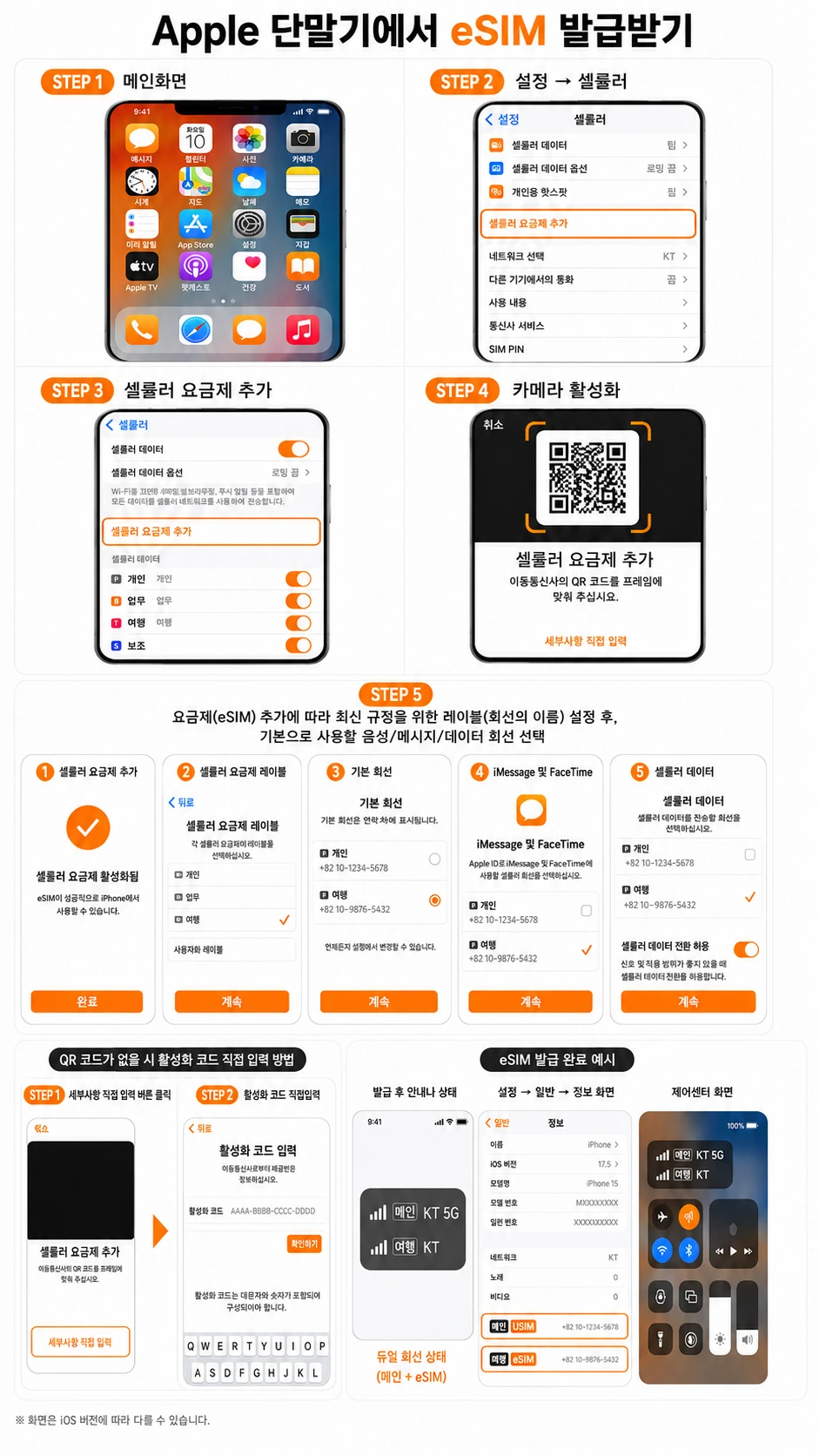
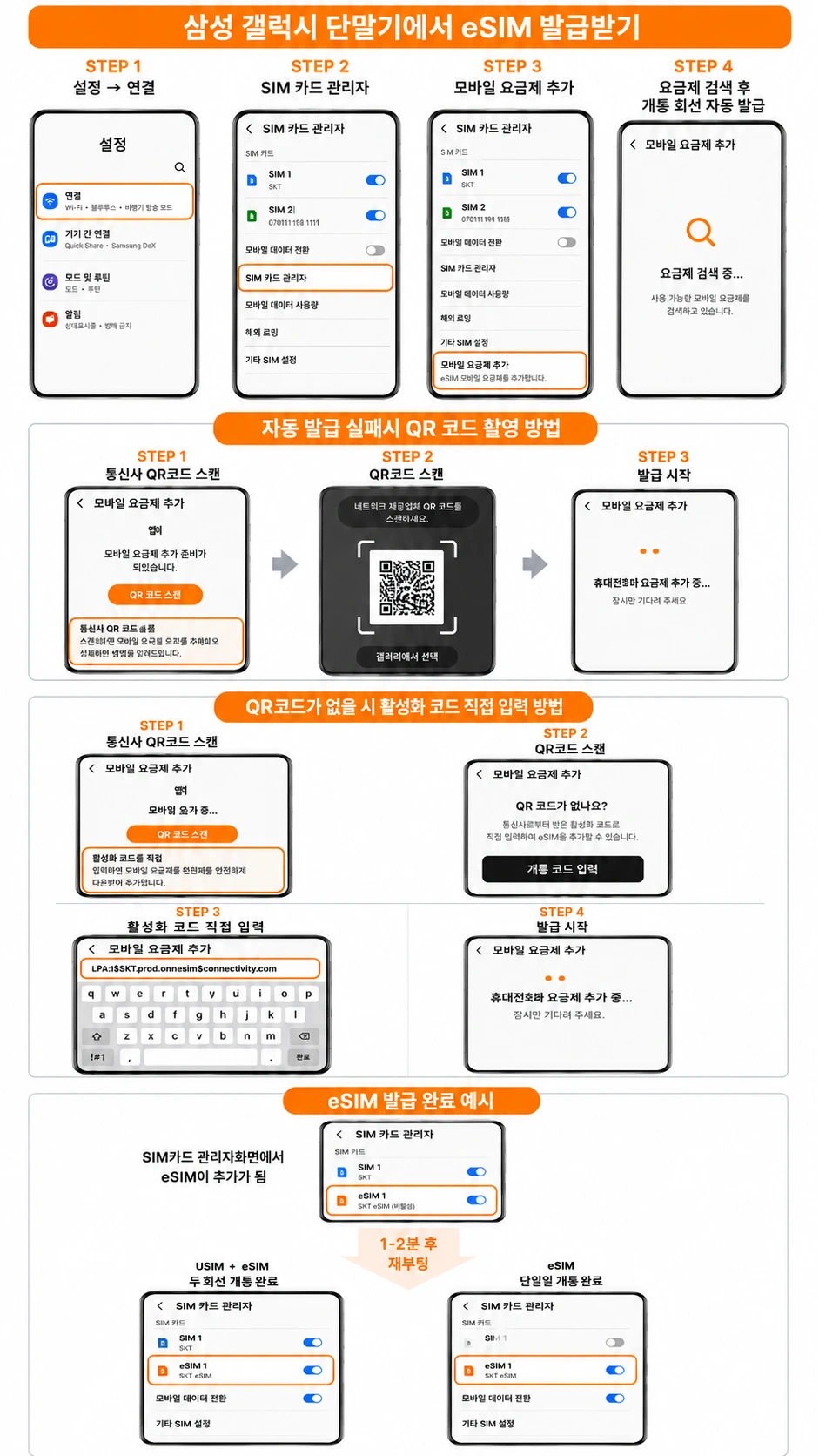
Connect to Wi-Fi, then scan the QR code: on iPhone, in Settings > Cellular > Add Cellular Plan; on Galaxy, in Settings > Connections > SIM manager > Add mobile plan.
- Add Cellular PlanIn Settings > Cellular, tap Add Cellular Plan.
- Scan the QR codePoint the camera at the QR code you received. If you do not have it, enter the activation code under Enter Details Manually.
- Choose your linesChoose a line label and the lines to use as the default line, for iMessage and FaceTime, and for cellular data.
- Reboot and checkAfter rebooting, check in Control Center that both lines appear.
- Add mobile planIn Settings > Connections > SIM manager, tap Add mobile plan.
- Scan the QR codeIf automatic issuance does not work, point the camera at the QR code you received using Scan carrier QR code.
- Enter the code manuallyIf you do not have a QR code, enter the activation code under “Don’t have a QR code? (QR코드가 없나요?)”.
- Reboot and checkAfter 1 to 2 minutes, reboot and check in SIM manager that the eSIM appears.
Can I use two numbers with my current SIM and an eSIM?
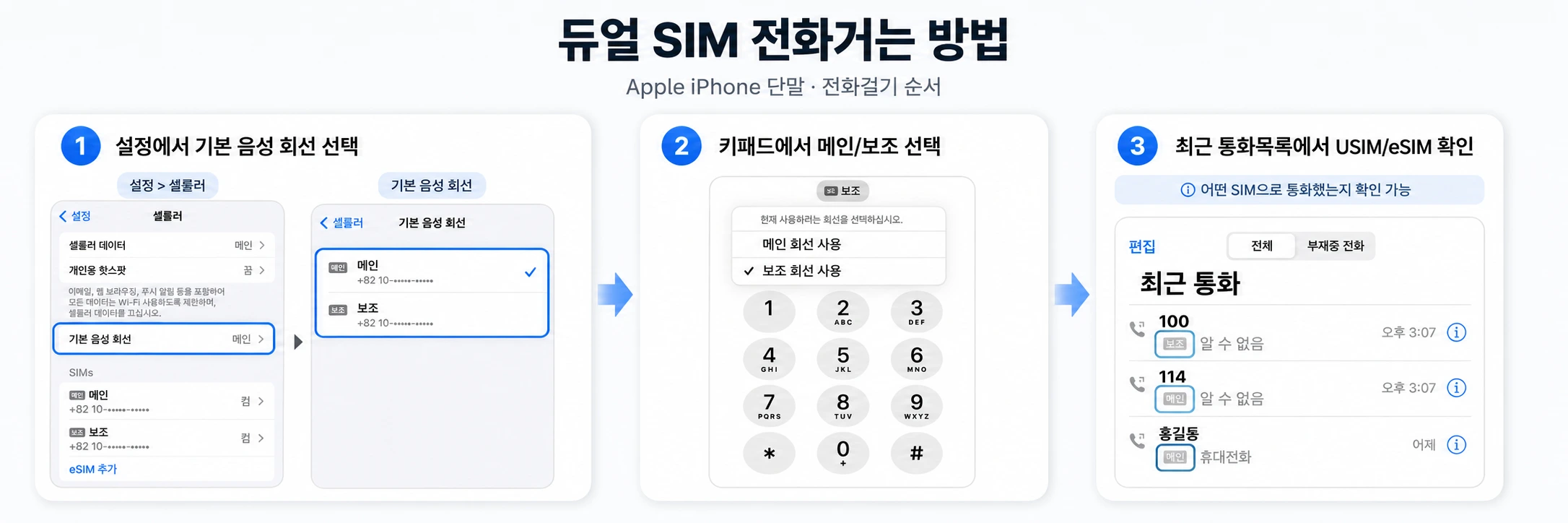
Yes. If you add an eSIM without removing your current SIM, you can use two numbers on one phone. Both lines must be in the same name.
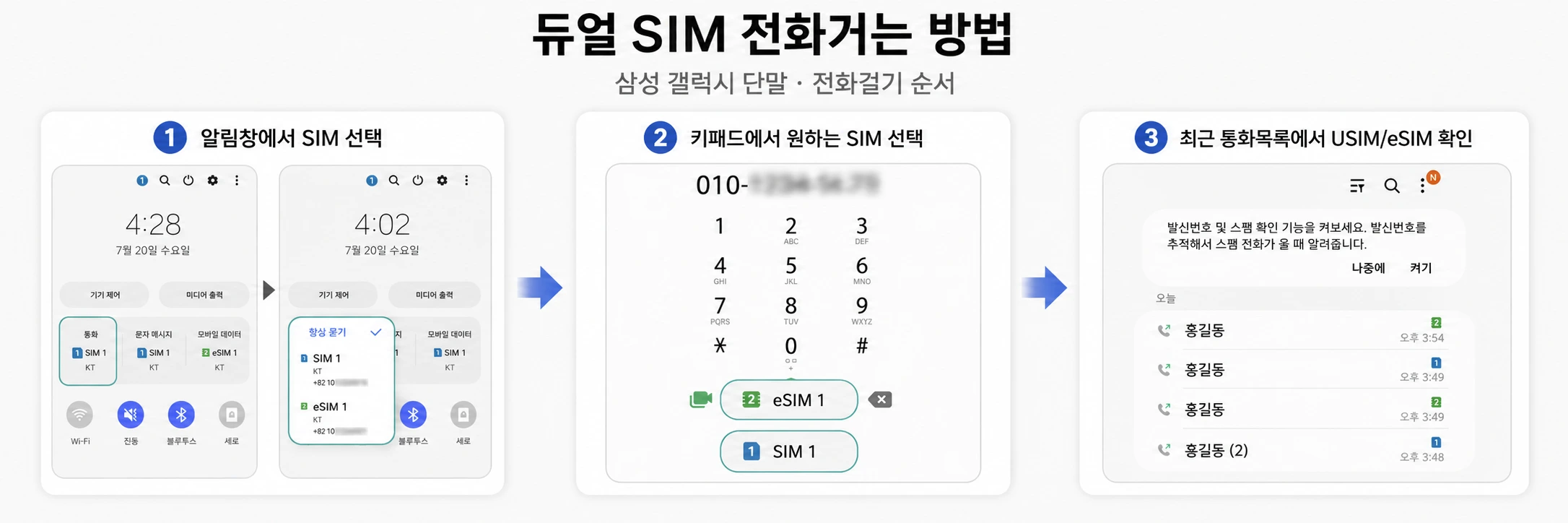
- Choose the line to use for calls on the keypad or in Settings, and for texts on the Messages screen.
- While you are on a call on one line, you cannot receive calls on the other line.
- On iPhone, you can have up to 2 active lines in total, counting the SIM and eSIM.
What are the prepaid eSIM plans and the first cost?
The first cost is the 2,750 KRW issuance fee plus the first month’s price of the plan you choose. LTE 396 comes to 42,350 KRW, and if you use plenty of data on a 5G phone, you can also choose 5G 464 (first cost 49,150 KRW).
| Plans | Data | Calls and texts | Monthly price |
|---|---|---|---|
| LTE Basic 1 | 300MB | 50 min of calls 30 texts | 12,100 KRW |
| 300MB Lite | 300MB 1Mbps after the allowance runs out | Calls included Texts included | 33,000 KRW |
| LTE 396 | 10.3GB 3Mbps after the allowance runs out | Calls included Texts included | 39,600 KRW |
| 5G 464 | 20GB 3Mbps after the allowance runs out | Calls included Texts included | 46,400 KRW |
| LTE 770 | 11GB + 2GB daily 3Mbps after the allowance runs out | Calls included Texts included | 77,000 KRW |
| 5GB daily | 5GB daily 5Mbps after the allowance runs out | Calls included Texts included | 85,900 KRW |
What should I do if I get stuck during eSIM activation?
Find the message on your screen and do what it says. If that does not fix it, capture the screen where you are stuck and send it to us on KakaoTalk.
| Screen or situation | What to do |
|---|---|
| Unregistered device (등록되지 않은 기기) | This is normal. Tap OK and go to the next step. |
| Barcode not recognized (바코드가 인식되지 않음) | Tap Manual entry (수기입력) and enter the values from the *#06# screen yourself. |
| Dual eSIM device in use by someone else (타인이 사용 중인 듀얼 eSIM 단말기) | Check that it is in the same name as your current SIM. If not, use a physical SIM or another spare phone. |
| Application keeps getting rejected | Check for a one-character error in the device model name, serial number, EID, and IMEI, and turn off “Restrict use of other SIMs (다른 SIM 사용 제한)” on Galaxy. |
| No signal after registering | Reboot the phone. Connect to Wi-Fi when you register. |
| Only receiving texts fails | Report a call quality issue to customer service (114 or 1899-7700). |
Things to know before activating an eSIM
- If you delete the profile or reset the phone, service is cut off, and to use it again you must get a reissue (2,750 KRW).
- A QR code and activation code can be used only once.
- The issuance fee can be paid only by credit card.
- A prepaid eSIM is activated only on the application screen (web). It is not available in the Membership app.
- Activation almost never works from overseas. LG prepaid also does not support international roaming.
- Number porting requires a number you have used for at least 3 months, with no overdue amounts or micropayment balance.
Prepaid eSIM FAQ
What exactly is an eSIM?
It downloads carrier information to a chip inside the phone. You activate with a QR code or activation code instead of inserting a plastic SIM.
Can KT prepaid also be activated with an eSIM?
No. N-Telecom prepaid eSIM is available only when you activate with LG. KT prepaid is activated with a Baro SIM.
Do I have to remove my current SIM?
No. If you leave your current SIM in and add the eSIM, you can use two numbers on one phone. Both lines must be in the same name.
Can I activate an eSIM if I have unpaid bills or credit delinquency?
Even with unpaid bills at another carrier, credit delinquency, or personal rehabilitation, a new sign-up for a prepaid eSIM in your own name is possible. Identity is verified without a credit check. If you have an unpaid N-Telecom bill, pay it in full first.
Can I activate with number porting too?
Yes. The number must have been used for at least 3 months, with no overdue amounts or micropayment balance. Please finish between 10:00 a.m. and 7:30 p.m., Monday to Saturday.
If I change phones, does the eSIM move too?
It cannot be moved like a SIM. You download it again on the new phone and pay the 2,750 KRW reissue fee again.
Can I register without Wi-Fi?
The profile is downloaded over the internet, so you need a connection. If the data on your current phone is not working, connect to Wi-Fi and then scan the QR code.
Can I use a transit card with an eSIM?
Cards stored on a SIM are not transferred. On Galaxy, you can issue an in-app transit card in Samsung Wallet even on a phone that uses only an eSIM. If you still have a Mobile T-money balance, keep your old SIM.
Can I not activate an eSIM without a certificate?
A simple authentication certificate is required for online eSIM activation. If you do not have one, first activate a physical SIM through in-person activation, then request the eSIM change at the center.
Can I switch my current SIM to an eSIM?
Yes. If you already use N-Telecom, you can switch by device change. It is handled on weekdays by visiting a center or through an agent, and costs 2,750 KRW.
What is “Restrict use of other SIMs (다른 SIM 사용 제한)” on Galaxy?
It is a feature under Settings > Security and privacy > More security settings > SIM card security. If it is on, activation is blocked, so please turn it off.
What happens to my eSIM if I change phones?
You must get it reissued on the new phone, and 2,750 KRW is charged again.
Can I delete the eSIM profile?
Deleting it cuts off service and cannot be undone. To use it again, you must get a reissue (2,750 KRW). Do not delete it until you change phones.
What if the barcode is not recognized?
Tap Manual entry (수기입력) and enter the values from the *#06# screen yourself. You can check the device model name with the calculator on this page.
Can I activate from overseas?
Activation from abroad is almost never possible. Please apply in Korea after you return. LG prepaid does not support international roaming either.
Written by Chickphone (N-Telecom dealer) · Based on N-Telecom guidance as of November 6, 2026 · View pre-approval document